CSS Variables Controlling Lamp + Glow + Login Form Colors
:root {
    --on: 0;
    --glow-color: hsl(320,40%,45%);
    --glow-color-dark: hsl(320,40%,35%);
    --opening: hsl(50, calc((10 + var(--on)*80)*1%), ... );
    --base-top: hsl(var(--accent),0%, calc((40 + var(--on)*40)*1%));
}
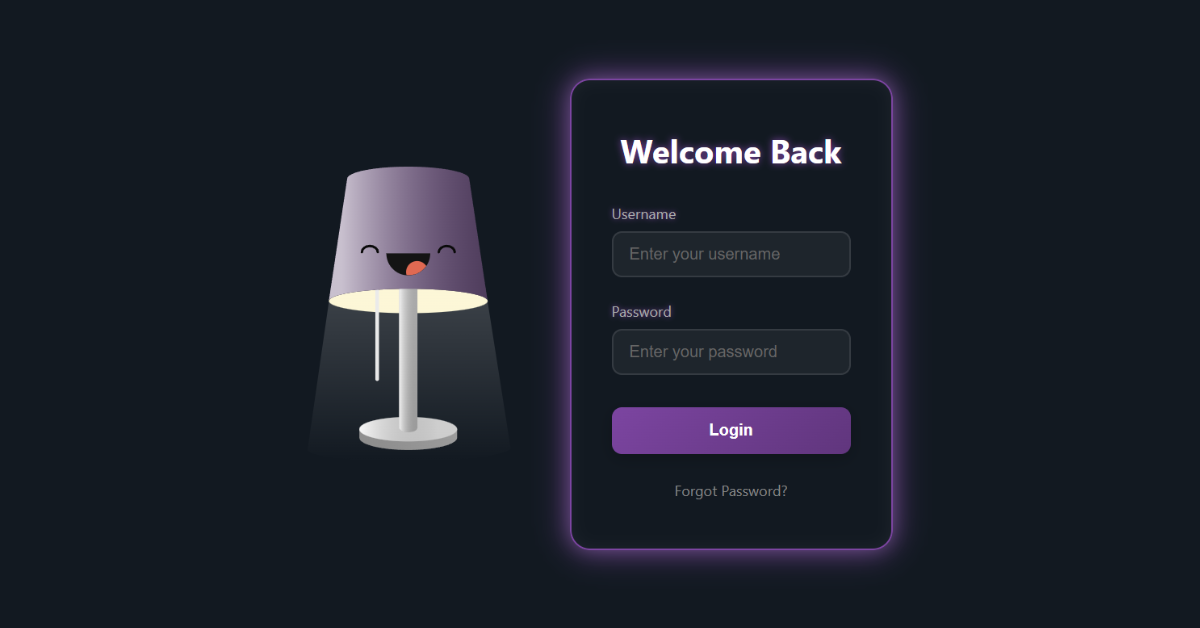
- The entire lamp lighting, shade colors, glow effect, and login form neon border all depend on
--on. - When the lamp toggles ON → JS sets
--on: 1, instantly updating all colors and glow effects. - Hue is randomized dynamically when the lamp toggles.
Login Form Reveal Animation
.login-form {
    opacity: 0;
    transform: scale(0.8) translateY(20px);
    pointer-events: none;
    transition: all 0.5s cubic-bezier(0.34,1.56,0.64,1);
}

.login-form.active {
    opacity: 1;
    transform: scale(1) translateY(0);
    pointer-events: all;
    border-color: var(--glow-color);
    box-shadow: 0 0 15px rgba(255,255,255,0.1),
                0 0 30px var(--glow-color),
                inset 0 0 15px rgba(255,255,255,0.05);
}
The login form stays hidden until the lamp is turned on.
When the lamp switches ON → JS adds .active → form fades in with a glowing neon border.
Timeline That Toggles the Lamp + Login Form
const CORD_TL = timeline({
    paused: true,
    onStart: () => {
        STATE.ON = !STATE.ON;
        set(document.documentElement, {"--on": STATE.ON ? 1 : 0 });

        // random color theme
        const hue = gsap.utils.random(0, 359);
        set(document.documentElement, {"--shade-hue": hue});
        set(document.documentElement, {"--glow-color": `hsl(${hue},40%,45%)`});
        set(document.documentElement, {"--glow-color-dark": `hsl(${hue},40%,35%)`});

        // toggle eyes + glow + form visibility
        set(".lamp__eye", { rotate: STATE.ON ? 0 : 180 });

        if (STATE.ON) LOGIN_FORM.classList.add("active");
        else LOGIN_FORM.classList.remove("active");
    },
    onComplete: () => RESET(),
});
This is the main logic of everything:
- Toggles lamp ON/OFF state.
- Updates all CSS colors dynamically.
- Switches eye expressions.
- Shows or hides the login form.
- Plays the “cord wiggle” animation.