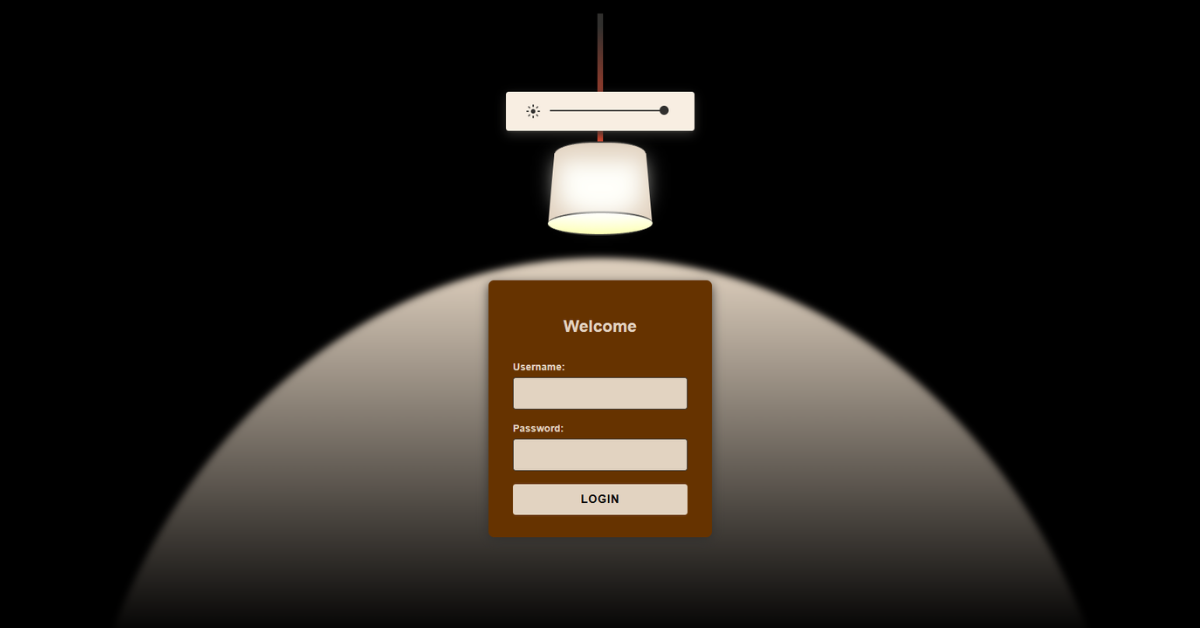
This project is a creative lamp-themed login interface where light intensity controls visibility and mood. A slider above the lamp adjusts how bright the lamp glows, simulating a real dimmer switch. As the light increases, the login form below the lamp gradually becomes visible. The entire lamp is drawn using pure CSS without images or SVG. Overall, the project demonstrates advanced CSS visuals, state-based styling, and minimal JavaScript logic.
HTML
<form class="slider-form" oninput="body.setAttribute('data-light', slider.value)">The HTML structures the page into three logical sections: the slider, the lamp, and the login form. The slider form sits above the lamp and updates a data-light attribute on the <body> element. This attribute acts as a global state controller for light intensity. The lamp itself is built from layered div elements representing the top, body, bottom, bulb, rope, and shadow. Each part is positioned carefully to resemble a real hanging lamp.
The login form is placed below the lamp so it appears illuminated naturally. Input fields for username and password follow standard accessibility practices. No external images or libraries are used. Inline JavaScript handles simple form submission. Overall, the HTML provides a semantic, state-driven structure.
CSS
body[data-light="10"] .login-form {
  opacity: 1;
  transform: translateY(0);
}
The CSS is the core engine of this project and handles both visuals and interaction. CSS variables define colors, sizes, and proportions, making the design easy to tweak. The lamp is drawn entirely using borders, gradients, skew transforms, and blur filters. Light intensity is controlled using attribute selectors such as body[data-light^="5"], which respond to slider values. As light increases, the bulb glow, wall shadow, and lamp brightness gradually intensify.
The login form fades in smoothly and moves upward as it becomes visible. Transitions ensure all changes feel natural and fluid. Hover effects enhance buttons and inputs. The background remains dark to emphasize the lighting effect. Overall, CSS transforms static elements into a dynamic, interactive scene.
JavaScript
function handleLogin(event) {
  event.preventDefault();
}
The JavaScript in this project is intentionally minimal and focused on logic only. It prevents the default form submission to avoid page reloads. User input values for username and password are read directly from the form fields. A simple validation check ensures both fields are filled before proceeding. On successful input, a welcome alert is displayed dynamically.
The form is then reset to its initial state. JavaScript does not control animations or styling at all. All visual behavior is handled through CSS attribute selectors. This separation keeps the code clean and maintainable. Overall, JavaScript acts purely as a functional helper.